


Tuesday, June 29, 2010
可能出生在这个家庭的关系,一位凡是出众的姐姐永远都要排在前面;总是高不可攀似的。还有一位功课一流的哥哥。很自然从小爸妈都会说着:“你看你姐姐哥哥读书多么厉害,你怎么不努力点呢?你太爱玩了,整天只顾着看戏玩耍!”还好这对我的影响不太大,但是心里还是会觉得不舒服。长大一点之后爸妈也放弃念我要考好成绩。求神拜佛我不太差或学坏就好。我的想法是每个人都有他们自己想过的生活,随着慢慢的成长过程也会改变想法。小时候我会自我安慰的说:“姐姐哥哥厉害是他们的事,我是我,我不必要和他们比较。总而言之不差太远就好。”十只手指有长短,尾指虽然短但是不代表它不好或没用。少了它反而缺少了应有的完美。为什么要介意你是食指还是尾指呢?但是往往你不去介意的同时,别人会自然的看不过眼的训你为什么你就那么甘愿成为‘尾指’?一幅你很不应该就是那种料的人。你将来一定后悔你现在的决定似的。除了自己以外,试问还有谁比自己更了解自己需要什么呢?
成长在一个凡是要积极,永远要比别人快一步,不能浪费每一天,一分,一秒。其实也蛮有压力。当然因为拥有以上优点的父母才能让他们的小孩-现在的我,不畏五斗米奔波。享受着有些人奢侈的生活。~ 无忧无虑的在英国留学,不必半供读,遭人白眼(部分的英国人都看不起华人)。还可以有多余的钱去邻国旅游,去Manchester看现场的足球比赛;和一班朋友在巴黎过白色圣诞;伦敦倒数新年;去过无数的国家旅游。这全都要谢谢他们-我的父母。
Sunday, June 27, 2010

Cindy thoughts to celebrate Father's Day in Seoul Korea. Before that i don't really love korean food as i tried last time with friends. But my sister highly recommend this restaurant. The restaurant is located in Plaza Danau 2, above a mamak stall. We booked a room which can fit around 7-8 ppl (minimum expenses RM200 only can reserved a room). We ordered barbecues set (pork, chicken, prawn, squid..etc) and a small portion of beef. Chicken Ginseng Soup and Fried Grass noodles.
We were given a selection of banchan (side dishes normally served in every Korean Restaurant). You can refills again if you wish. They are all delicious. Besides, a free SALAD with special dressing served and it taste FRESH and really burst up your appetite. The waiter will barbecue each meat we ordered in very good service. We just eat and eat and drink beers... hahaha.. satisfied!!
After dinner they will give us a Free Beverage (Ginger drink) and few slices of watermelon and some korean sweets.
Restaurant Seoul Korea
No. 1-1 (1st), Plaza Danau 2, Jalan 4/109F, Taman Danau Desa, 58100 Kuala Lumpur.
Opening hours: 11am – 10.30pm
Telephone number: 03-7982 4607
Sunday, June 6, 2010
This year i bought a body shower cream and body shop bath puff for her. Just a little present but full of my love oh!! I package it nicely... love this package! hahahahha...
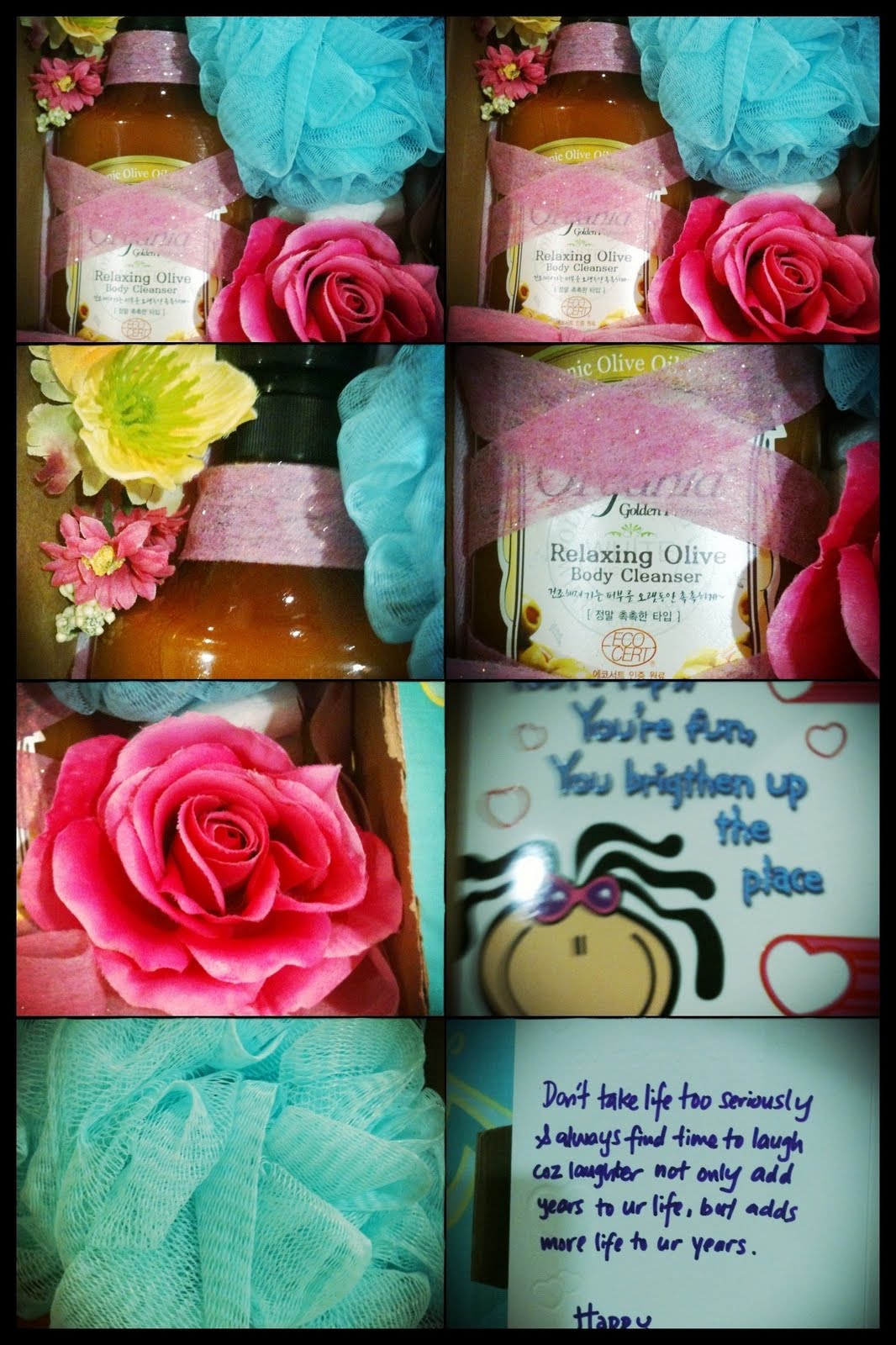

Nice ma?? I added some artificial roses to fill up the empty space inside the box. The color matching so sweet.
My Dear Ching Yee need me to become her 'white rat'. For me.. i feel that a bit over but if for real bride..maybe that's fine or need somemore touch up..=)
I'll just upload few that i like..some abit 'fake' as i dun used to have 'thick' makeup, but some of my friends said that's look good.


Wednesday, May 12, 2010
Last few days i just learn to Block Websites Like MySpace, Facebook, Twitter on any Computer. That's very simple way to do it. Papa Ed helps me to solve some problem too.. thanks! I got above solutions from a website
I just share the same thing here with you all and also a note for me to refer back if i need it someday again.
1. Open 'hosts' file in a text editor (you can use the search to search for files & folders - remember to check 'include hidden files', as the host file is a hidden file)
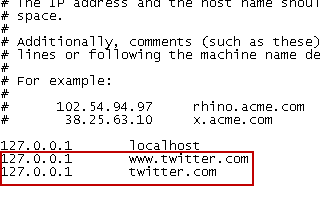
2. once you found your 'hosts' just open with a notepad. Then you will get below text shown
- For instance, if you wish to block twitter from your computer, then the following files must be added to the hosts file,
After adding all the websites that you want to block, save the file. Now try to open the blocked websites in your browser.(need to close and reopen the browser)
To unblock the websites again, simply remove those lines from hosts file.
hohoho... thanks to papa edmond teach me how to jailbreak my iphone. Before that i'm still worrying if i jailbreak my phone whether still keep my warranty from maxis? As i just bought my phone for about 2 months. Then papa ed teach me how to back up my SHSH so if any problem to my iphone, i can still claim my warranty.. Yahoo~~
I will just copy and paste what he tells me, to share with those who interested to jailbreak their phone. If you do not understand, can ask me but them dun expect i can help you.. hahahhaha coz i'm not papa edmond ma!!! hahahah
----------------------------------
1. Go to run and type %appdata%\Apple Computer\iTunes
This is ur backup folder, make a copy of this folder… (just in case
Go to ur phone , copy out the photos as well (actually its included in the backup , double insurance)
2. save your shsh
Follow instruction here
http://www.redmondpie.com/save-shsh-blobs-ecid-shsh-iphone-3.1.3-ipad-3.2-9140709/
Use the AUTOSHSH program.
Note: you might need to download java from www.java.com to run AUTO SHSH download the autoshsh first.. If it failed, then download java.
(on the step 2 i don't understand and edmond explain to me: HOLD ur HOME ROUND BUTTON + POWER BUTTON... until it suddenly go black, then RELEASE POWER BUTTON (still holding home button
then it will have a graphic of USB in ur iphone)
3. run the program first then plug ur phone into itunes, cancel the sync or backup
4. In Recovery Mode Screen (it shows a cable and a CD looking iTunes icon), press and hold power + home for about 10 seconds, this will shut the screen down. Let go of buttons!
5. If your iphone firmware not updated to 3.1.3 then u need to update 1st. then only can continue with Step 6.
6. Download the program from "http://www.spiritjb.com/ " (this is the official websites)
Run the program
Connect iPhone with your computer, Run “Spirit” and then Click on “Jailbreak”:
Note: IF there is an error msg, then Change the “Compatibility mode” to “Windows 98 / Windows Me” by right clicking on “Spirit.exe”, and then click on “Properties”
7. Let the app do its thing and wait for the app to show “Jailbreak Complete!” message. At this point, wait for the iPhone to automatically reboot.
After reboot, search or look for CYDIA.. If its there, meaning u have successful jailbreak ur phone. after this.. follow these steps to let u download PAID apps for free.
8. How to install Cracked app
1. Launch Cydia
2. Click on “Manage” on the bottom of the Cydia screen
3. Select “Sources” from the Cydia screen.
4. Select “Edit” on the top right of the screen. (You should be on a list of sources).
5. Select “Add” from the top left of the screen.
6. Enter the following when prompted: ttp://cydia.hackulo.us
7. Press “Add Source“.
8. Once the source has been added, go to “Search” on the bottom of the Cydia window.
9. Type in “Installous” and continue.
10. Install “Installous” on your iPhone from Cydia.
11. Go back to “Search” on the bottom of the Cydia window.
12. Type in “AppSync” and continue.
13. Install “AppSync for OS3.1“.
14. You will need to likely respring/restart your phone, so when Cydia prompts you to, just continue until you’re back to your iPhone home screen.
15. Find “Installous“ icon in ur iPhone main screen, and load the application.
16. Locate the Application you want from the Installous Browser (which browses Appulo.us).
17. Install and enjoy!
Hope above information helps you!! That's work for me!~
Friday, May 7, 2010
So happy that i just jailbreak my iphone by myself with help of papa edmond. Thanks for his help. After jailbreak, i've been busy searching for apps. I found out Iphone really can make life easier and can use it for many many things that can't help me in others phone. Below are some pages of my Iphone apps. This is my photography apps which i mostly use it everyday. hahahaha... Apps like Super Camera and Camera Plus can take nice photos and you can took photo with flash. MoreBeaute i love it soooo much as this apps can smoothen your skin and you will looks great after edit with this. Most recent apps i use is Andigraf which you can took 4-9 photos and combined it together. I love this effect of those photo taken. For those who love to take self portrait, Snapful apps is a must for you!!
 Above are the apps related to business ( my job). Some common apps like facebook, MSN, Skype are commonly used in iphone user. Besides, JotNot is a VERY useful app for me to SCAN document and email out/ Copy document for reference, etc. QuickOffice helps me to store all documents (word, excel, pdf, jpg...etc) which i can refer. Very user friendly and easy to drag file into iphone. VNC Viewer is a remote software in connecting another computer, if i have this apps, i can check out my company system even i'm at overseas/ at home.

Above all those games which i played. Some are really fun.
--------------------------------------------------------------


This is the photo i took using Andigraf apps.

Using Classic Instant apps


Screenshot by QuickOffice


